
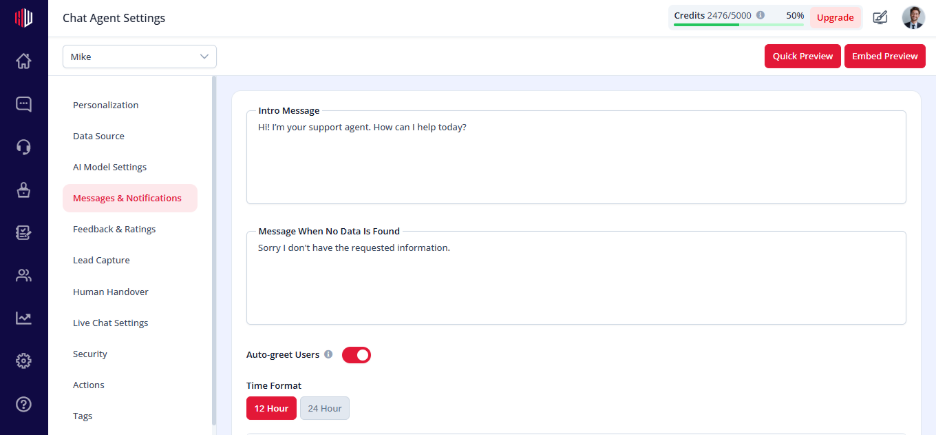
This lets you define the first message users see when the chat opens.
A good intro message helps users understand what they can ask and encourages them to start the conversation.
Steps #
- View the agent in the dashboard
- Go to Edit
- Open Messages & Notifications
- Find Intro Message
- Enter your message
(Example: “Hi! How can I help you today?”)
How it works #
- Shown when the chat opens
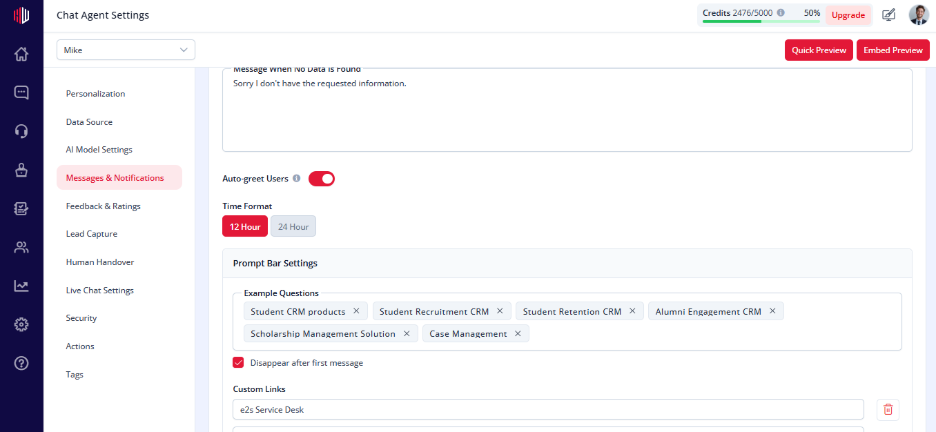
- Works with Auto-greet Users (if enabled)
- Sets the tone for the conversation
When to use #
- Welcome users
- Guide what they can ask
- Highlight what your agent can help with
Important Notes #
- Shown only if Auto-greet Users is ON
- Keep it short and clear
- Should match your agent’s role
Tips #
- Add a helpful hint:
“Ask me about pricing, features, or support”
- Keep the tone friendly and direct
Next, enable Auto-greet Users to show this message automatically.
If you have any questions, concerns, or need further clarification, please contact support@highengage.com for assistance.


