
This lets you add a contact option inside the chat so users can easily reach you when needed.
It’s useful when users want help beyond the chatbot.
Steps #
- Go to your Agent Dashboard
- Click Edit
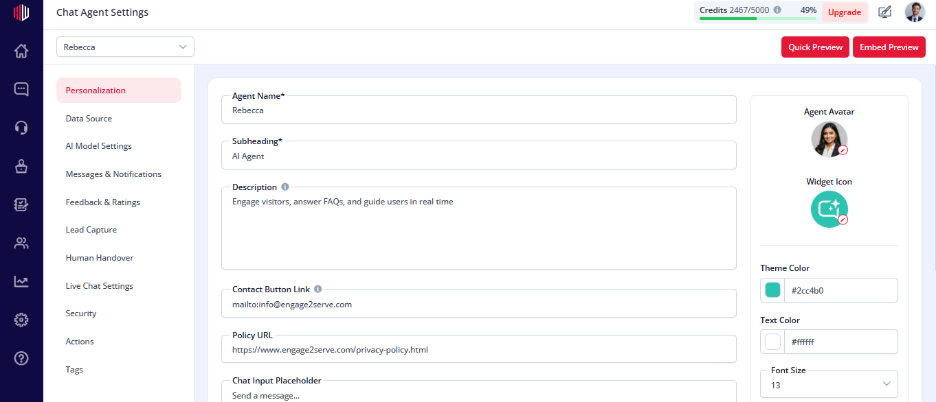
- Open Personalization
- Find Contact Button Link
- Enter your link:
- Website page → https://yourwebsite.com/contact
- Email → mailto:youremail@example.com
How it appears #
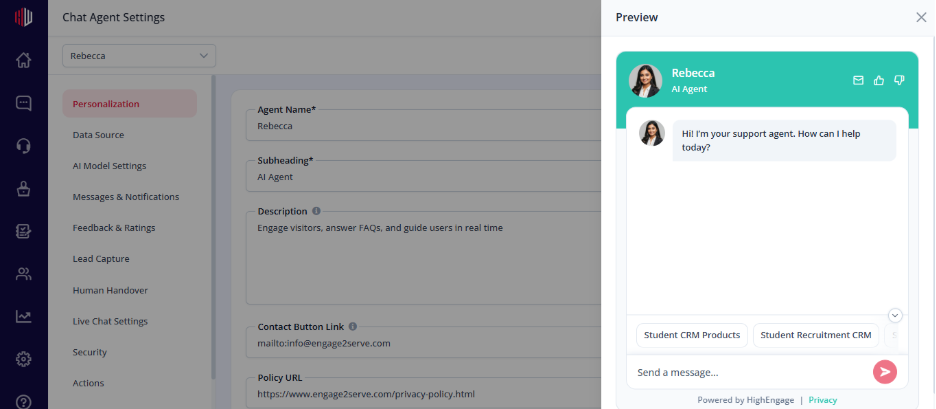
- A contact option is shown inside the chat in the top right corner of the chat
- Users can click it to:
- Visit your contact page
- Send an email
Important Notes #
- Link must be in a valid URL format
- For email, always use mailto: format
- Helps users reach you when chat is not enough
Next, use Quick Preview to check how the contact option appears in the chat.
If you have any questions, concerns, or need further clarification, please contact support@highengage.com for assistance.


