
This lets you control how many messages a user can send within a certain time.
It helps prevent spam, abuse, and excessive usage.
Steps #
- View your agent in the dashboard
- Go to Edit
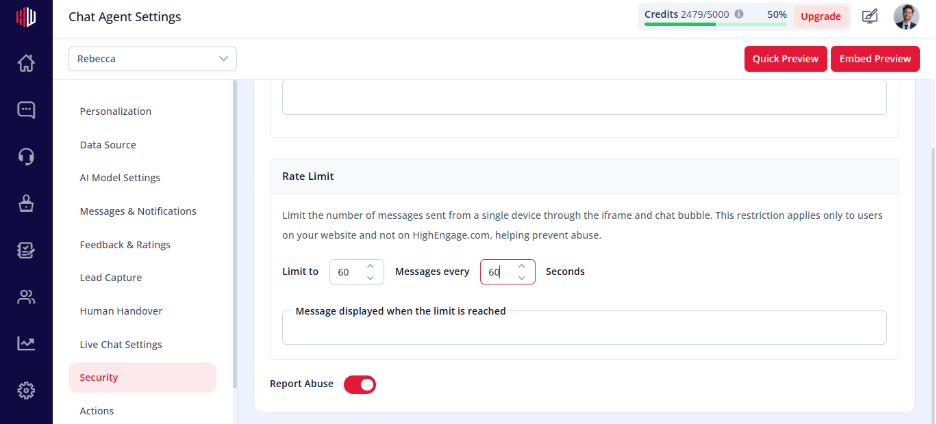
- Open Security
- Find Rate Limiting
- Set the limits:
- Number of messages
- Time window (e.g., 30 seconds)
How it works #
- The system tracks how many messages a user sends
- If the limit is exceeded:
- Further messages are temporarily blocked
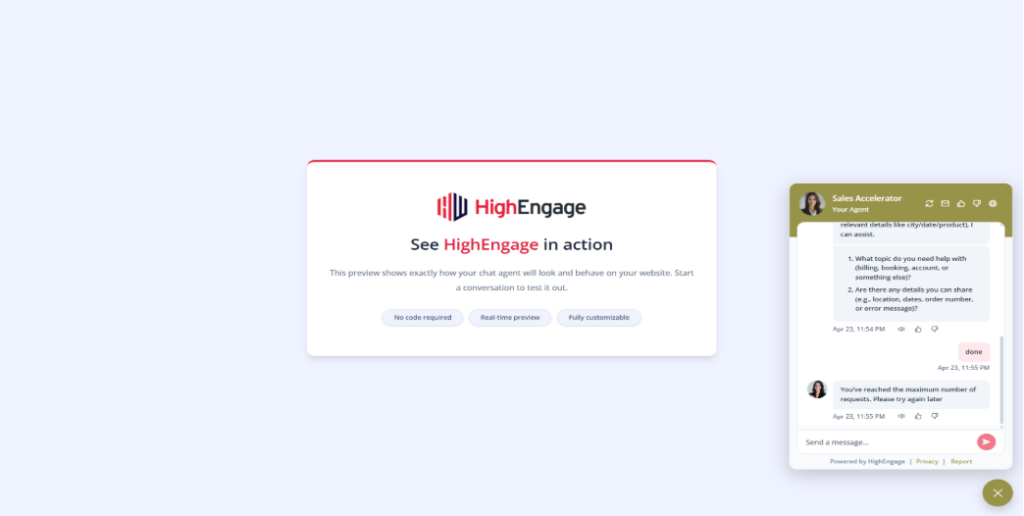
- User may see a restriction message
Example
- Limit = 10 messages per 30 seconds
- User sends 10 messages → allowed
- Sends 11th message → blocked until reset
When to use #
- Public-facing chatbots
- High-traffic websites
- To prevent spam or bot abuse
Important Notes #
- Applies per user/session
- Does not affect normal usage if set reasonably
- Helps control credit consumption
Tips #
- Start with moderate limits (e.g., 10–20 messages/60 seconds)
- Adjust based on usage patterns
- Combine with Abuse Reporting for better control
Next, test your chatbot in Preview by sending multiple messages quickly to verify the limit.
If you have any questions, concerns, or need further clarification, please contact support@highengage.com for assistance.


