
What this does #
This lets your AI agent collect basic user details during a chat for follow-up and tracking.
It helps you turn conversations into actionable leads.
Steps #
- View your agent in the dashboard
- Go to Edit
- Open Lead Capture
- Enable the fields:
- Name
- Phone
- (Optional) Mark fields as Mandatory
How it works #
- After the trigger, the agent starts asking:
- Name
- Phone
- Each field is asked one at a time
- Users respond directly in the chat
Field behavior #
- Name → Identifies the user
- Email → Used for follow-up communication
- Phone → Used for calls or messaging
Optional controls #
- Mandatory ON → User must provide the value
- Mandatory OFF → User can skip the field
Important Notes #
- Fields are collected in sequence
- Data is saved automatically
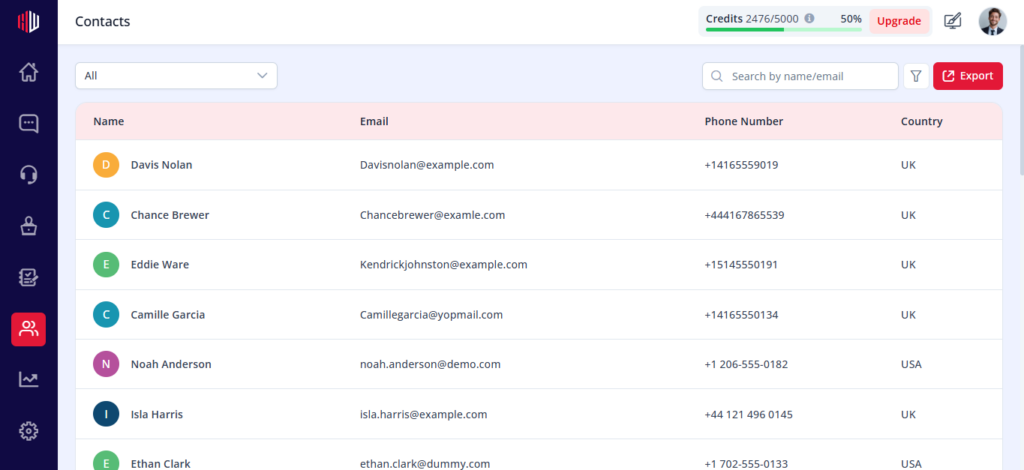
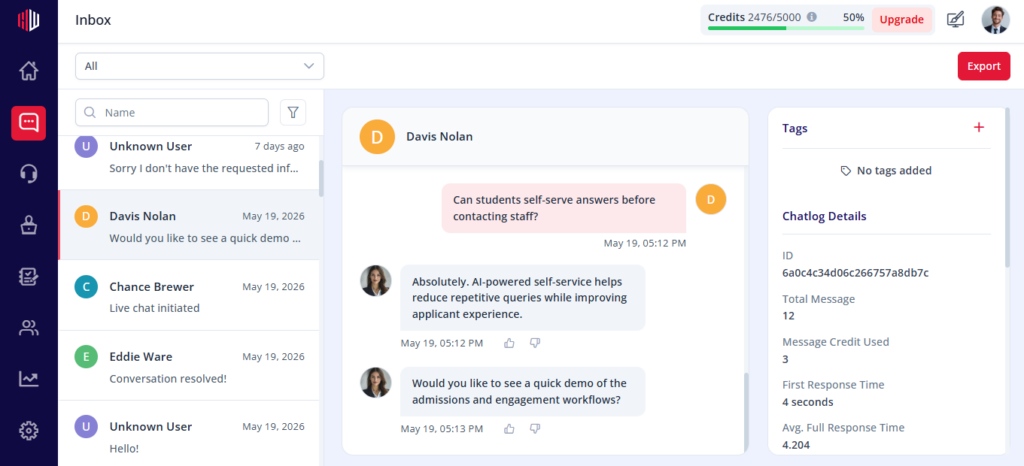
- Available in:
- Contacts
- Inbox (User Details)
Tips #
- Enable only the fields you really need
- Avoid making all fields mandatory
- Use a smooth transition before asking
Example:
“Can I get your details to help you better?”
Next, go to Contacts to view and manage captured user details.
If you have any questions, concerns, or need further clarification, please contact support@highengage.com for assistance.


