
This lets you hand over the conversation to a human after a set number of user messages.
It’s useful when you want to step in after a certain level of engagement.
Steps #
- View your agent in the dashboard
- Go to Edit
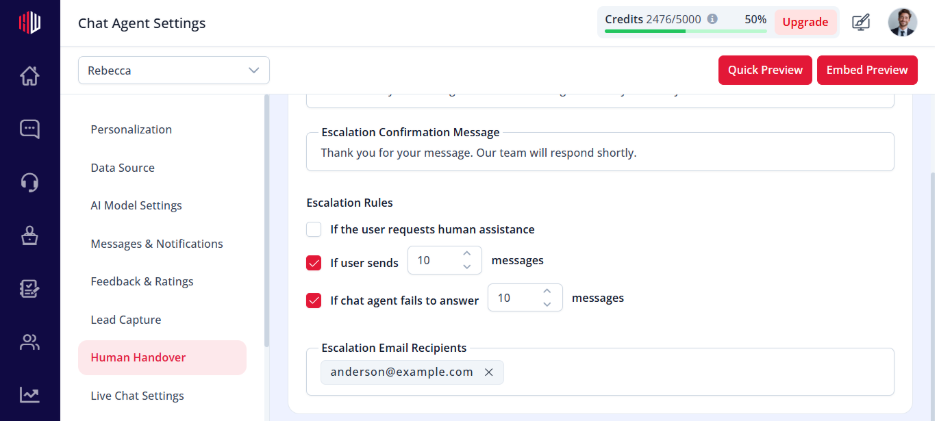
- Open Human Handover
- Turn Enable Human Assistance → ON
- Enable Message Count Trigger
- Set the limit:
After [N] user messages
How it works #
- The system counts user messages
- Once the limit is reached:
- Escalation Request Message is shown -User submits their message
- Confirmation Message is shown -Your team is notified
Example #
- Limit = 5 messages
- User sends 5 messages
- On the 5th message → escalation is triggered
When to use #
- High-intent conversations
- Sales or demo requests
- When you want human involvement after initial interaction
Important Notes #
- Counts user messages only
- Works only when Human Assistance is enabled
- Can be combined with other triggers (failures, user request)
Tips #
- Set threshold between 3–6 messages
- Use a smooth transition message
Example: “Would you like to continue this with our team?”
- Combine with Lead Capture for better follow-up
Next, use Preview to test when escalation is triggered based on message count.
If you have any questions, concerns, or need further clarification, please contact support@highengage.com for assistance.


