
This hands the conversation to a human when your AI fails to answer repeatedly.
It helps avoid frustration by stepping in at the right time.
Steps #
- View your agent in the dashboard
- Go to Edit
- Open Human Handover
- Turn Enable Human Assistance → ON
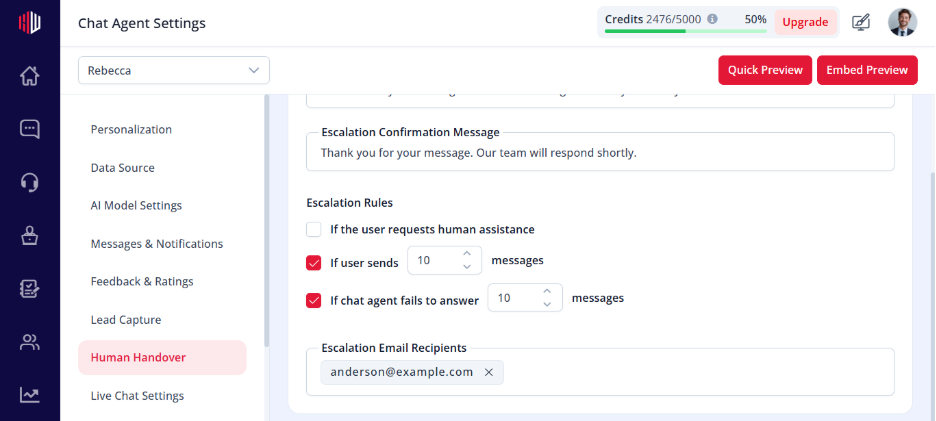
- Enable Failure Count Trigger
6. Set the limit:
If chat agent fails to answer [N] messages
How it works #
- The system tracks failed responses
- When the limit is reached:
- Escalation Request Message is shown
- User submits their message
- Confirmation Message is shown
- Your team is notified
Example #
- Limit = 2 failures
- AI fails twice
- On the second failure → escalation is triggered
What counts as a failure #
- No relevant answer found
- Fallback message is shown
- Low-confidence response
Important Notes #
- Works only when Human Assistance is enabled
- Combine with other triggers for better coverage
- Prevents repeated poor responses
Tips #
- Set limit between 1–3 failures
- Keep escalation messages clear and helpful
- Combine with Live Chat for instant support
Next, use Preview and ask unsupported questions to test when escalation is triggered.
If you have any questions, concerns, or need further clarification, please contact support@highengage.com for assistance.


