
This lets users give feedback on individual AI responses (like 👍 or 👎).
It helps you identify which answers are helpful and where the AI needs improvement.
Steps #
- View your agent in the dashboard
- Go to Edit
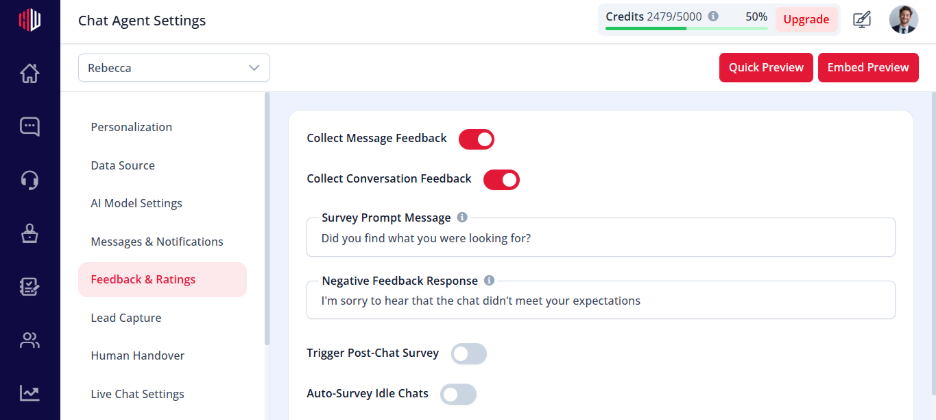
- Open Feedback & Ratings
- Find Collect Message Feedback
- Turn the toggle ON
How it works #
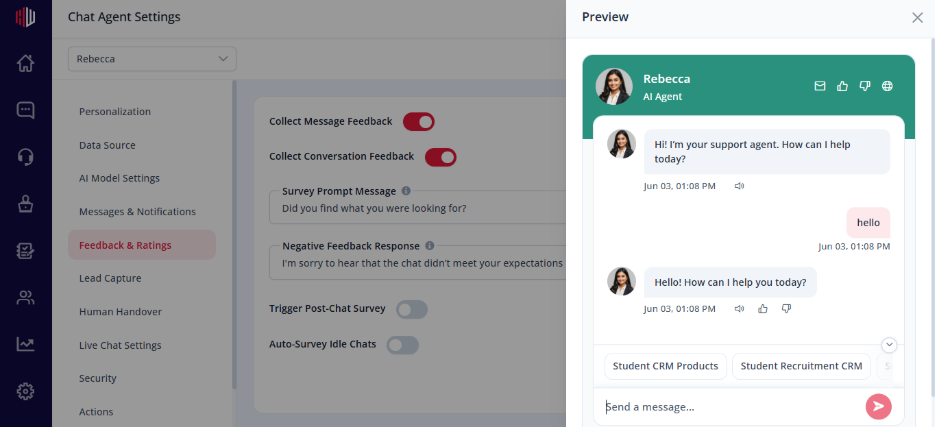
- Each AI message shows feedback options
- Users can rate responses (positive or negative)
- Feedback is captured automatically
Where feedback appears #
- Corrections → Pending (for review)
- Helps you fix inaccurate or unclear answers
Important Notes #
- Feedback is collected per message
- Negative feedback can trigger correction workflows
- Works across all conversations
Tips #
- Enable this to continuously improve your AI
- Review feedback regularly in Corrections
- Combine with Corrections to fix issues quickly
Next, use Preview and try giving feedback on AI responses to see how it’s recorded.
If you have any questions, concerns, or need further clarification, please contact support@highengage.com for assistance.


