
This lets users choose to talk to a human during a conversation.
It gives users a clear way to get help when the AI isn’t enough.
Steps #
- View your agent in the dashboard
- Go to Edit
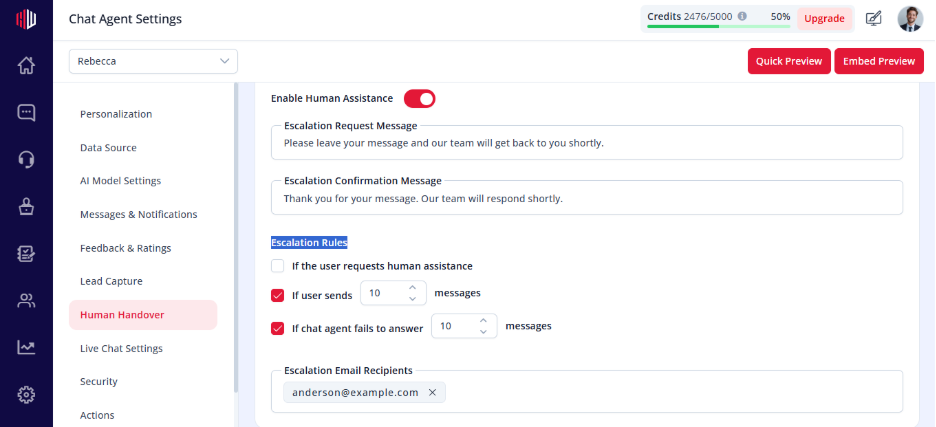
- Open Human Handover
- Turn Enable Human Assistance → ON
- Enable User-Initiated Escalation
How it works #
Users see an option to request human help , when selected:
- Agent shows the Escalation Request Message
- User enters their message
- Agent shows an Escalation Confirmation Message
- Your team is notified
What users experience #
- Clear option to escalate
- Smooth transition from AI to human
- No need to repeat previous messages
Important Notes #
- Requires at least one notification recipient
- Works even without Live Chat (for follow-up)
- Messages are stored in Inbox
Tips #
- Keep the escalation message simple
Example: “Would you like to talk to our team?”
- Combine with failure-based triggers for better coverage
Next, use Preview to test how users can request human assistance.
If you have any questions, concerns, or need further clarification, please contact support@highengage.com for assistance.


