
This lets your AI agent hand over conversations to a human when needed.
Use this when queries require manual support or follow-up.
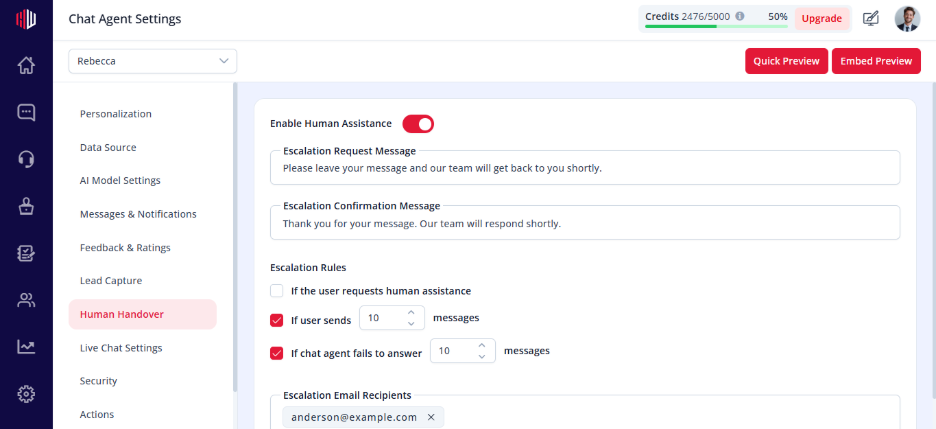
Steps #
- View your agent in the dashboard
- Go to Edit
- Open Human Handover
- Find Enable Human Assistance
- Turn the toggle ON
How it works #
Once enabled, the agent can:
- Offer a Talk to Human option
- Trigger escalation based on rules
- Collect user messages for follow-up
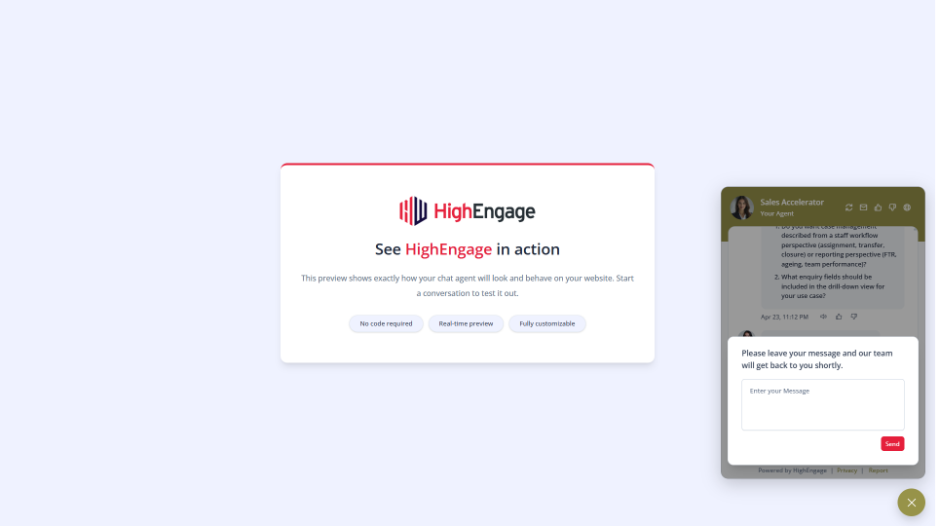
What happens during escalation #
- User requests help (or a trigger is met)
- Agent shows the Escalation Request Message
- User submits their message
- Agent shows a Confirmation Message
- Your team receives a notification
Important Notes #
- At least one escalation rule must be configured
- Requires notification recipients to be set
- Works with both Live Chat and follow-up workflows
Tips #
- Keep escalation messages clear and friendly
- Use this for queries AI cannot resolve
- Combine with Live Chat Settings for real-time support
Next, set up your escalation triggers to control when conversations are handed over.
If you have any questions, concerns, or need further clarification, please contact support@highengage.com for assistance.


