
This lets you control how your AI thinks and responds.
A good prompt improves answer quality, tone, and consistency across all conversations.
Where to write it #
- View your agent in the dashboard
- Go to Edit
- Open AI Model Settings
- Find Prompt
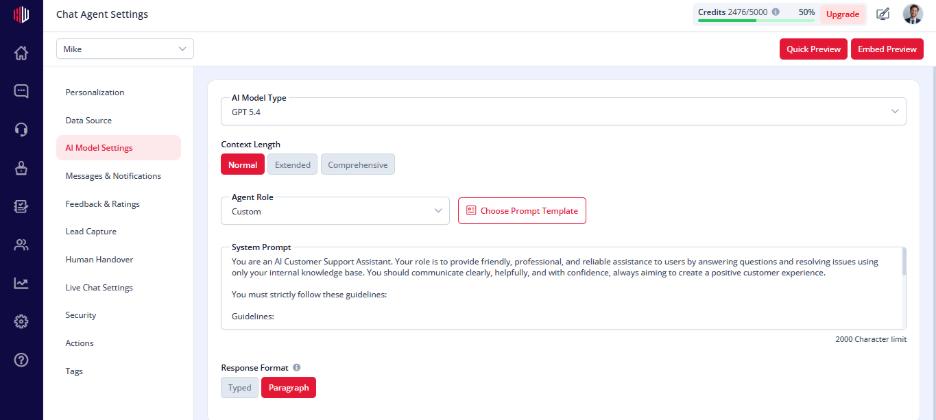
How to write a good prompt #
Keep it clear and structured. Focus on these parts:
1. Role #
Tell the AI what it is.
Example:
You are a support assistant helping users with product issues.
2. Responsibilities #
Define what the AI should do.
- Answer user questions
- Guide users
- Ask follow-up questions when needed
3. Boundaries #
Set clear limits.
- Do not guess
- Do not answer outside provided data
- Ask for clarification if unsure
4. Tone #
Decide how the AI should sound.
- Friendly
- Professional
- Concise
Simple prompt example #
You are a support assistant.
Answer only from the provided data.
If unsure, ask for clarification.
Keep responses short and helpful.
Important Notes #
- Changes apply immediately
- Editing the prompt makes the role Custom
- Maximum length: 2000 characters
Tips #
- Keep it simple and focused
- Use short, clear instructions
- Test and refine based on actual conversations
Next, use Quick Preview to see how your prompt affects AI responses.
If you have any questions, concerns, or need further clarification, please contact support@highengage.com for assistance.


